
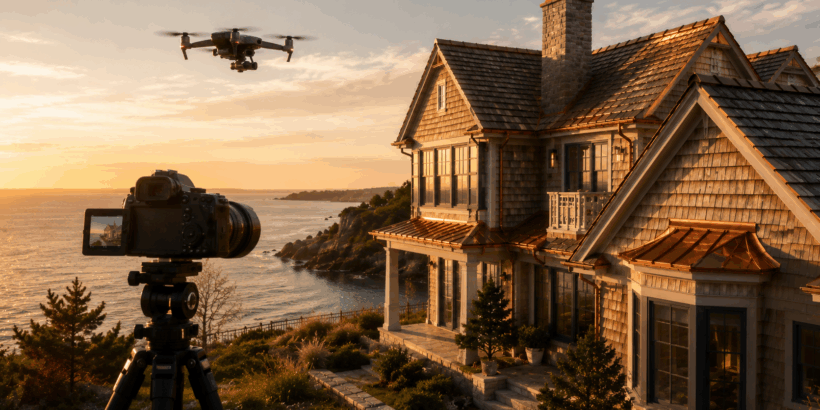
Architectural photography sits at one of the most technically demanding intersections in the discipline. Unlike portrait or sports work, where the subject moves and the photographer adapts, architectural photography requires absolute precision in a static scene — correct perspective, managed dynamic range, accurate color rendering of materials, and the compositional discipline to let a structure communicate its own logic without imposing a narrative on it.
Premium exterior photography raises the stakes further. When the subject is a high-value coastal property with complex material surfaces — cedar shingles weathering to silver-gray, copper flashing developing its characteristic green patina, EPDM flat roof sections transitioning to pitched cedar faces — the camera system, lens choices, and exposure technique either capture those material qualities faithfully or they flatten them into something generic. The difference between the two outcomes determines whether the photography earns its commission.
This guide covers the full technical workflow for premium exterior architectural photography: camera and lens selection, exposure management for challenging coastal light, color calibration for natural materials, drone work for complex roof geometries, and post-processing discipline that enhances without fabricating.
Camera System Selection for Architectural Work
The fundamental requirement for serious architectural photography is resolution sufficient to capture fine material texture — the grain of cedar shingles, the oxidation patterns on copper flashing, the subtle relief of hand-woven corner joints in wood siding — without aliasing or noise that degrades print or large-format digital use.
Medium format sensors set the ceiling for this work. The Fujifilm GFX 100S II and GFX 50S II deliver resolution and dynamic range that no 35mm system matches for large-scale reproduction, and the GFX 100S II’s 102-megapixel sensor produces files with enough data to crop aggressively while retaining texture detail. For photographers whose clients include luxury real estate marketing, architecture publications, and design portfolios, medium format is a legitimate professional tool rather than an indulgence.
For photographers working within 35mm systems, the Sony A7R V (61MP), Nikon Z8 (45.7MP), and Canon EOS R5 Mark II (45MP) represent the practical ceiling of resolution available in the format. All three produce files that are adequate for most architectural publication requirements, and all three pair with perspective-control (tilt-shift) lenses that are essential for technically correct architectural work.
| Camera | Sensor / Resolution | Dynamic Range | Key Advantage for Architecture | Tilt-Shift Lens Availability |
|---|---|---|---|---|
| Fujifilm GFX 100S II | Medium format / 102MP | ~15 stops | Maximum resolution and tonal depth for large format | Limited native; adapters for Schneider/Rodenstock |
| Sony A7R V | Full frame / 61MP | ~15 stops | Best-in-class AF; pixel shift for 240MP composite | Sony FE 24mm f/3.5 T/S (via adapter) |
| Nikon Z8 | Full frame / 45.7MP | ~14.7 stops | Excellent high-ISO for dawn/dusk exteriors | PC Nikkor 19mm f/4E, PC-E 24mm f/3.5 |
| Canon EOS R5 II | Full frame / 45MP | ~14.5 stops | Best color science for warm wood tones | TS-E 17mm f/4L, TS-E 24mm f/3.5L II |
| Fujifilm GFX 50S II | Medium format / 51.4MP | ~14 stops | Medium format rendering at more accessible price | Limited native; adapters required |
Lenses: Why Perspective Control Is Non-Negotiable
The single most important lens category for architectural photography is the perspective-control (tilt-shift) lens — and it is the most commonly omitted piece of equipment among photographers entering architectural work from other specializations.
When you photograph a building from ground level with a standard lens, keeping the camera level produces a composition where the building is cut off at the top. Tilting the camera upward to include the full facade introduces converging verticals — the building appears to lean backward. This is not a stylistic choice; it is a geometric distortion that makes the structure look incorrect.
A tilt-shift lens solves this by allowing the image circle to be shifted upward relative to the sensor while keeping the camera body level. The verticals remain parallel. The building looks like a building. For premium architectural work — particularly for structures with complex rooflines, multiple story heights, and distinctive vertical elements like the cupolas and dormer configurations common in New England coastal architecture — this correction is essential.
Canon’s TS-E 17mm f/4L and TS-E 24mm f/3.5L II are the most capable options in the Canon system. Nikon’s PC Nikkor 19mm f/4E and PC-E 24mm f/3.5D are the equivalent Nikon tools. For Sony shooters, the options are more limited natively, but the Laowa 15mm f/4.5 Zero-D Shift provides an alternative without the full tilt capability.
Exposure Strategy for Complex Exterior Surfaces
Premium exterior surfaces — particularly the combination of dark cedar shingles, bright copper flashing, white trim details, and sky — present a dynamic range challenge that single exposures frequently cannot resolve cleanly. The textured shadow areas of a cedar shake roof in afternoon light may be 8–10 stops below the sky behind it. Exposing for the sky blows the copper highlights; exposing for the shadows clips the sky entirely.
The professional workflow for this situation involves one of three approaches depending on the specific scene:
HDR Exposure Bracketing
Shoot a bracket of three to five exposures at one or two stop intervals, then blend in post using Lightroom’s HDR merge, Photoshop’s manual blending, or dedicated HDR software like Photomatix Pro. The goal is not the tonemapped HDR aesthetic of the 2010s — that look is architecturally dishonest and reads immediately as processed. The goal is a single natural-looking exposure that contains detail in both the shadow texture of cedar shingles and the highlight detail of copper and sky.
Graduated ND Filters
For scenes with a clean horizon line between a bright sky and a darker structure, a graduated neutral density filter darkens the upper portion of the frame by two to four stops, allowing a single exposure that captures both sky and building texture. This approach is less flexible than bracketing but produces cleaner files with no blending artifacts. Lee Filters and NiSi both produce high-quality graduated ND systems; the NiSi 100mm V7 Pro is particularly well-regarded for architectural work.
Flash / Strobe Fill
For close-range facade details — the junction between cedar siding and copper flashing, the texture of hand-woven corner joints, the profile of individual shake courses — a battery-powered strobe used as fill light allows precise control of the light-to-shadow ratio independent of ambient conditions. Profoto’s B10X Plus and the Godox AD600Pro are both portable enough for exterior location work while delivering sufficient output for fill at architectural distances.
Shooting Coastal Light: Timing and Direction
Natural material surfaces — cedar, copper, weathered wood — reveal their character most completely in directional light that creates relief and shadow across textured surfaces. Flat overcast light, while useful for avoiding harsh shadows on full-facade shots, flattens material texture in ways that make a premium cedar shake roof indistinguishable from asphalt in a photograph.
The optimal shooting windows for coastal exterior work are the two to three hours after sunrise and the two hours before sunset, when low-angle directional light rakes across surface texture at angles that create the shadow depth necessary to read individual shingle courses, siding profiles, and flashing details. The warm color temperature at these times also renders cedar and copper more accurately than the blue-shifted light of midday.
Coastal properties present an additional variable: the relationship between the structure’s orientation and the direction of ocean light. A west-facing facade photographed at golden hour with ocean behind the camera produces the ideal combination of warm directional light and blue water context. The same facade shot from the water side at the same time produces a silhouette. Understanding the light-to-structure geometry before arriving on location is part of professional pre-production for architectural commissions.
The case study documentation of the Woods Hole coastal renovation project — featuring multiple roof pitches, a cupola, copper-detailed dormers, and Alaskan yellow cedar siding — illustrates exactly the kind of multi-plane exterior geometry that rewards careful light timing. The variation in surface angle across a complex multi-pitch roof means that optimal light for the main facade planes and optimal light for the cupola details may occur at slightly different times; professional architectural photographers typically shoot multiple sessions across different light conditions for projects of this complexity.
Drone Photography for Complex Roof Geometries
The standard ground-level perspective cannot communicate the geometry of complex multi-pitch roofs, terrace configurations, and cupola details that characterize premium coastal architecture. Drone photography has become an essential complement to ground-level architectural work for any structure with significant roof complexity.
The DJI Mavic 3 Pro and DJI Air 3 are the current leading platforms for professional architectural drone work at reasonable cost. The Mavic 3 Pro’s Hasselblad-tuned 4/3-inch sensor delivers color science and dynamic range that significantly outperforms the smaller sensors in consumer-grade drones, and its triple-camera system — wide, medium telephoto, and telephoto — provides the lens selection necessary to compose roof-level shots without the distortion that wide drone lenses impose on architectural geometry.
For photographers using drone imagery in premium real estate and architecture contexts, the FAA Part 107 certification is a professional requirement. Beyond the regulatory compliance, Part 107 training covers the airspace awareness and operational procedures that make coastal drone work — where wind conditions change rapidly and airspace near waterways requires particular attention — safer and more controllable.
| Drone Platform | Sensor Size | Max Resolution | Key Feature for Architecture | Approx. Price |
|---|---|---|---|---|
| DJI Mavic 3 Pro | 4/3 inch (main) | 50MP (main camera) | Hasselblad color science; triple camera system | ~$2,200 |
| DJI Air 3 | 1/1.3 inch | 48MP | Dual camera (wide + medium tele); excellent portability | ~$1,100 |
| DJI Inspire 3 | Full frame | 50.3MP RAW | Cinema-grade output; interchangeable lenses | ~$16,000 |
| Autel EVO II Pro V3 | 1 inch | 40MP | 6K video; adjustable aperture f/2.8–f/11 | ~$1,800 |
| Skydio 2+ | 1/2.3 inch | 12MP | Best-in-class obstacle avoidance for complex structures | ~$1,000 |
Color Calibration for Natural Building Materials
Cedar, copper, and weathered wood are among the most color-sensitive subjects in architectural photography. Cedar ranges from warm honey-gold when freshly installed to silver-gray after extended UV exposure; the transition involves subtle warm undertones that are easily lost in aggressive post-processing. Copper transitions from bright reddish-orange to warm brown to the characteristic blue-green verdigris of oxidized copper — a color that sits in a range that auto white balance frequently misinterprets toward cooler, less accurate tones.
The professional workflow for accurate material color rendering involves three steps. First, shoot a color reference card (X-Rite ColorChecker Passport or equivalent) in the same light as the structure and use it to create a custom camera profile in Lightroom or Capture One. Second, use manual white balance set from a neutral reference in the scene rather than auto white balance, which shifts between frames and makes consistent color across a multi-shot series impossible. Third, evaluate material color against physical reference — if you have a material sample from the project, compare it to your calibrated monitor rather than relying on memory.
Post-Processing Discipline for Architectural Work
The most common post-processing errors in architectural photography are over-clarity, over-saturation, and excessive sky replacement. All three produce images that look processed rather than photographed — and sophisticated clients in the premium real estate and architecture market recognize the difference immediately.
Cedar texture is enhanced by moderate clarity increases (5–15 in Lightroom’s Texture slider) that define individual shingle courses without creating an artificial HDR appearance. Copper tones are best handled with targeted hue/saturation adjustments in the orange and yellow channels rather than global saturation increases that shift every other color simultaneously. Sky replacement, when used, should match the light direction and color temperature of the actual shot — a sky with sun from the left behind a building that was photographed with sun from the right reads as incorrect to any careful observer.
The test for appropriate post-processing in premium architectural work is simple: does the finished image look like the building under ideal natural conditions, or does it look like a rendering? The former is the standard; the latter is a failure mode that no amount of technical sophistication in capture can rescue.
Frequently Asked Questions
What is the best camera for architectural photography in 2025?
For professional architectural work requiring maximum resolution and tonal depth, the Fujifilm GFX 100S II is the leading choice in medium format. In the 35mm full-frame category, the Sony A7R V at 61 megapixels provides the best combination of resolution, dynamic range, and versatility. For photographers already invested in Canon or Nikon systems, the EOS R5 Mark II and Nikon Z8 are both fully professional tools. Camera body choice matters less than lens quality and technique — a perspective-control lens on a mid-range body will outperform a standard zoom on the highest-resolution camera for technically correct architectural work.
Do I need a tilt-shift lens for real estate photography?
For professional architectural and premium real estate photography, a tilt-shift (perspective-control) lens is close to essential for correct results. Converging verticals — the apparent leaning-backward of buildings photographed with the camera tilted upward — can be partially corrected in post-processing, but the correction involves cropping the image and resampling in ways that reduce effective resolution and introduce subtle distortion. Capturing correct perspective in-camera with a tilt-shift lens produces cleaner results with more image data to work with. For casual real estate photography, vertical correction in Lightroom is a reasonable compromise.
How do I photograph copper roofing and flashing accurately?
Copper’s color shifts significantly with oxidation stage — from reddish-orange when new, to warm brown, to blue-green verdigris on aged copper. Accurate rendering requires manual white balance set from a neutral reference in the scene, a custom camera profile created from a color calibration target shot in the same light, and targeted post-processing that adjusts copper tones in isolation rather than through global saturation changes. Shoot in RAW format to preserve the full tonal range of copper highlights, which are easily clipped in JPEG capture. Copper reflects directional light strongly — side lighting at low sun angles reveals surface texture and oxidation patterns most effectively.
What drone should I use for real estate and architectural photography?
For professional real estate and architectural drone work, the DJI Mavic 3 Pro is the current leading choice at a professional but accessible price point. Its Hasselblad-tuned sensor and triple-camera system provide the image quality and focal length flexibility that architectural work requires. The DJI Air 3 is a capable alternative at lower cost, particularly for photographers whose drone work is supplementary to ground-level photography rather than a primary deliverable. Avoid using consumer-grade drones with small sensors for premium architectural clients — the image quality difference is visible at large output sizes.
How do I handle high-contrast coastal light when photographing building exteriors?
Coastal light — particularly the combination of bright sky, reflective water, and dark material surfaces like cedar shingles — frequently exceeds the dynamic range of a single exposure. The professional workflow involves exposure bracketing (three to five frames at one-to-two-stop intervals) blended in post-processing to produce a natural-looking composite with detail in both shadows and highlights. Graduated neutral density filters are useful for scenes with clean horizon lines. For close-range detail shots where precise control matters most, a battery-powered strobe used as fill light gives you independent control over the shadow-to-highlight ratio regardless of ambient conditions.
What time of day is best for photographing coastal properties?
The two to three hours after sunrise and the two hours before sunset provide the directional light quality that reveals architectural texture and material character most effectively. These windows also deliver warmer color temperatures that render cedar and copper tones more accurately than midday blue-shifted light. The specific optimal time depends on the building’s orientation — you need the sun at an angle that illuminates the primary facade planes rather than backlighting them. Scout the location before the shoot to understand the light-to-structure geometry, and plan to shoot the main facade shots during the optimal window for that orientation.
How do I photograph cedar shingles and shake roofing to show texture?
Cedar texture reads best in raking light — directional illumination at a low angle relative to the surface — which creates micro-shadows across individual shingle courses and reveals the dimensionality of the material. Frontal or flat light flattens cedar texture regardless of camera resolution. Shoot during the low-sun windows (early morning or late afternoon) with the sun at roughly 30–60 degrees to the surface plane for maximum texture rendering. In post, use Lightroom’s Texture slider at moderate values (8–15) rather than Clarity, which creates haloing artifacts on repetitive textures. Avoid aggressive sharpening, which creates artificial edge enhancement that makes cedar look harder and more uniform than the material actually is.
What post-processing software is best for architectural photography?
Capture One Pro is the preferred raw processor among professional architectural photographers for its superior color rendering, more precise masking tools, and better handling of fine texture detail compared to Lightroom. Lightroom Classic remains the more common choice for photographers who need its asset management capabilities and broader plugin ecosystem. For perspective correction beyond what tilt-shift lenses provide, PTLens and DxO ViewPoint both offer more precise geometric correction tools than Lightroom’s built-in transform panel. Photoshop remains the standard for complex sky work, exposure blending, and any compositing that requires layer-based editing.